Concrete Calculator
Calculate the amount of concrete and materials needed for your construction project.
The Ultimate Concrete Calculator:
Concrete is the foundation of modern construction. Whether you’re building a house, laying a slab, or erecting columns, one thing always matters: accuracy in calculation. Knowing how much cement, sand, and aggregate you need saves both time and money, while also preventing unnecessary waste.
Traditional calculations with pen and paper can often be confusing and prone to error. That’s where a modern concrete calculator comes in — offering a smarter, faster, and clearer way to estimate materials. This article explains in detail how this calculator works, its features, and why it is an essential tool for both professionals and individuals working on small projects.
Why a Concrete Calculator is Essential
Calculating concrete requirements involves two important steps:
- Determining the total volume for your chosen shape.
- Breaking down that volume into the exact proportions of cement, sand, and aggregate.
When these calculations are done manually, it’s easy to miscalculate dimensions, mix ratios, or units. The results?
- Shortages: You run out of material before the job is complete.
- Wastage: You order far more than needed, wasting money and resources.
- Weak Structures: Wrong proportions can affect the strength of the concrete.
A smart concrete calculator removes these risks by delivering instant, accurate, and clear results.
Key Features of the Concrete Calculator
This modern concrete calculator doesn’t just provide numbers. It’s been designed to create a smooth, interactive, and professional experience for the user.
1. Interactive and Dynamic Form
One of the most impressive features is the dynamic form that adapts in real time to your selections.
Shape-Specific Fields
Instead of showing all possible input fields at once, the calculator updates instantly based on the shape you choose.
- Select Slab → see fields for length, width, and depth.
- Select Column → see fields for diameter and height.
- Select Wall → see fields for length, height, and thickness.
This not only makes the form look clean but also avoids confusion by showing only what is relevant.
Live Unit Switching
The calculator supports both Metric and Imperial systems. Switching between them updates all unit labels automatically.
- Metric system shows values in meters and cubic meters.
- Imperial system shows values in feet, inches, and cubic feet.
This flexibility is a huge advantage for users around the world, as different regions rely on different measurement systems.
Custom Concrete Mix
Sometimes, standard mix ratios may not fit the exact requirements of a project. In such cases, you can choose Custom Mix, which reveals an extra section where you can enter your own ratios of cement, sand, and aggregate.
This feature is particularly useful for engineers and experienced builders who work with specific project demands.
2. Modern User Interface (UI) and Responsive Design
Ease of use is just as important as accuracy. The calculator has been designed with a clean and modern layout that looks good on all devices.
Clean, Organized Layout
The form is divided into logical sections, making it simple to follow step by step. Icons and headings guide you through shape selection, dimensions, unit settings, and results.
Helpful Tooltips
To make things even easier, small info icons appear next to important fields. Hovering over them provides extra explanations, ensuring even beginners understand exactly what to enter.
Fully Responsive
Whether you are on a large desktop screen, a tablet at a construction site, or a smartphone at home, the calculator adjusts automatically. This ensures the tool is accessible anywhere, anytime.
3. Seamless and Instant Calculations
Speed and convenience are major highlights of this calculator.
No Page Reloads
When you click the “Calculate” button, results are generated instantly in the background without needing to refresh the page.
Loading Indicator
While the calculation is being processed, a small spinner appears to let you know the tool is working.
Dynamic Results Display
Once complete, the results are displayed instantly below the form. This quick feedback makes the experience smooth and professional.
4. Clear and Detailed Results
The results section has been designed to be not only accurate but also easy to read and apply directly on-site.
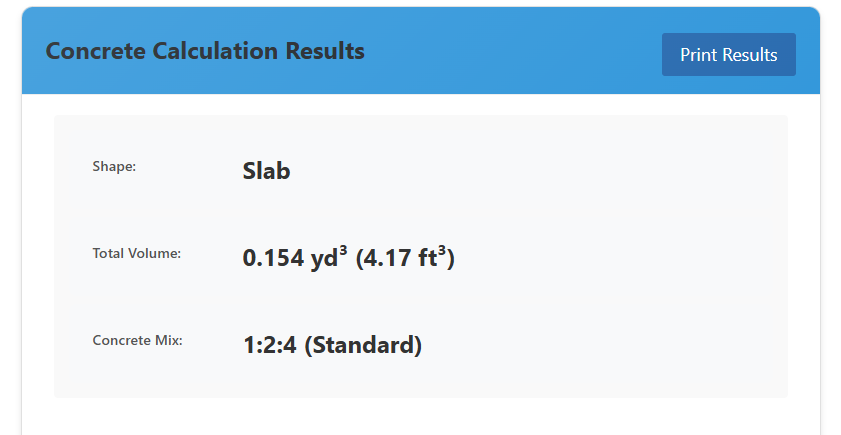
Organized Summary
Results are broken down into two clear categories:
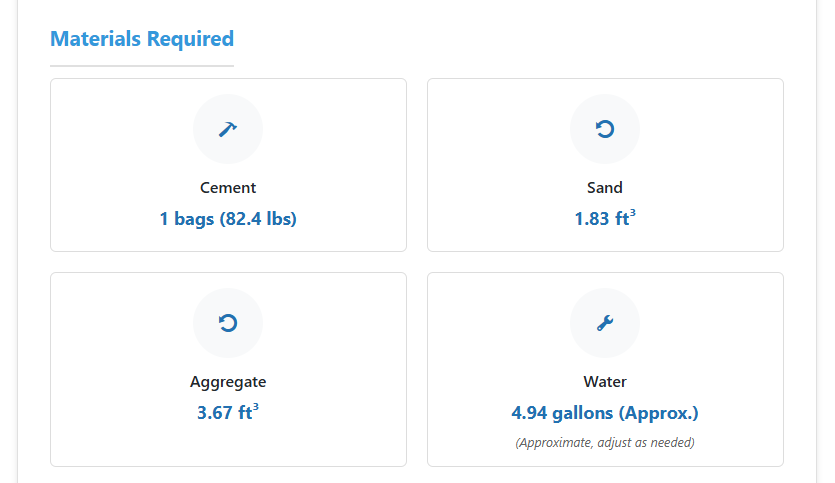
- Total Volume of concrete required.
- Materials Needed: separate quantities of cement, sand, and aggregate.
Practical Units
Outputs are displayed in the most practical units. For example, in the Imperial system, sand and aggregate quantities are shown in cubic feet — a measurement that suppliers commonly use when delivering materials.
Professional Design
The results appear in modern card-style boxes with clean typography and spacing. This makes the data visually appealing, easy to digest, and professional enough to share with clients or team members.
Benefits for Professionals and Individuals
This concrete calculator is designed for everyone — from large-scale contractors to homeowners taking on small renovation projects.
- Accuracy: Eliminates errors common in manual calculations.
- Time-Saving: Provides results instantly with just a few inputs.
- Flexibility: Supports multiple shapes, units, and custom mix ratios.
- Better Planning: Helps you order the exact amount of material needed, avoiding shortages and excess.
- Professional Results: Makes calculations clear and presentable for clients, suppliers, or colleagues.
Other Useful Tools
If you are interested in other smart tools that simplify calculations, check out the Pet Age Calculator. Just like the concrete calculator, it has been built with accuracy and user-friendliness in mind.
External Resources for Learning More
For those who want to deepen their knowledge of concrete and construction, here are some excellent references:
- The Constructor – Concrete Mix Design Guide – Step-by-step guidance on concrete mix proportions.
- Cement Concrete & Aggregates Australia – A resource hub for concrete basics and industry standards.
Final Thoughts
The Concrete Calculator is more than just a digital form. It’s an intelligent, interactive, and user-friendly solution for accurate construction material estimation. With its dynamic form, responsive design, instant results, and clear summaries, it saves time, reduces errors, and ensures materials are used efficiently.
Whether you’re a professional contractor managing large projects or an individual working on a small DIY build, this calculator helps you plan better, cut costs, and achieve precise results.
By combining technology with practical design, it transforms the way concrete is calculated — making construction planning smarter, faster, and more reliable.