You have content in both versions. Which one would you like to keep in single mode?
📝 Version A
📝 Version B
Choose Version for Single Mode
×
You have content in both versions. Which one would you like to keep in single mode?
📝 Version A
📝 Version B
Choose Version for Single Mode
×
You have content in both versions. Which one would you like to keep in single mode?
📝 Version A
📝 Version B
Choose Version for Single Mode
×
You have content in both versions. Which one would you like to keep in single mode?
📝 Version A
📝 Version B
Choose Version for Single Mode
×
You have content in both versions. Which one would you like to keep in single mode?
📝 Version A
📝 Version B
Choose Version for Single Mode
×
You have content in both versions. Which one would you like to keep in single mode?
📝 Version A
📝 Version B
Choose Version for Single Mode
×
You have content in both versions. Which one would you like to keep in single mode?
📝 Version A
📝 Version B
Choose Version for Single Mode
×
You have content in both versions. Which one would you like to keep in single mode?
📝 Version A
📝 Version B
Choose Version for Single Mode
×
You have content in both versions. Which one would you like to keep in single mode?
📝 Version A
📝 Version B
Choose Version for Single Mode
×
You have content in both versions. Which one would you like to keep in single mode?
📝 Version A
📝 Version B
Choose Version for Single Mode
×
You have content in both versions. Which one would you like to keep in single mode?
📝 Version A
📝 Version B
Choose Version for Single Mode
×
You have content in both versions. Which one would you like to keep in single mode?
📝 Version A
📝 Version B
Choose Version for Single Mode
×
You have content in both versions. Which one would you like to keep in single mode?
📝 Version A
📝 Version B
Choose Version for Single Mode
×
You have content in both versions. Which one would you like to keep in single mode?
📝 Version A
📝 Version B
Choose Version for Single Mode
×
You have content in both versions. Which one would you like to keep in single mode?
📝 Version A
📝 Version B
Choose Version for Single Mode
×
You have content in both versions. Which one would you like to keep in single mode?
📝 Version A
📝 Version B
Choose Version for Single Mode
×
You have content in both versions. Which one would you like to keep in single mode?
📝 Version A
📝 Version B
Choose Version for Single Mode
×
You have content in both versions. Which one would you like to keep in single mode?
📝 Version A
📝 Version B
Choose Version for Single Mode
×
You have content in both versions. Which one would you like to keep in single mode?
📝 Version A
📝 Version B
Choose Version for Single Mode
×
You have content in both versions. Which one would you like to keep in single mode?
📝 Version A
📝 Version B
Choose Version for Single Mode
×
You have content in both versions. Which one would you like to keep in single mode?
📝 Version A
📝 Version B
Choose Version for Single Mode
×
You have content in both versions. Which one would you like to keep in single mode?
📝 Version A
📝 Version B
Choose Version for Single Mode
×
You have content in both versions. Which one would you like to keep in single mode?
📝 Version A
📝 Version B
Choose Version for Single Mode
×
You have content in both versions. Which one would you like to keep in single mode?
📝 Version A
📝 Version B
Choose Version for Single Mode
×
You have content in both versions. Which one would you like to keep in single mode?
📝 Version A
📝 Version B
Choose Version for Single Mode
×
You have content in both versions. Which one would you like to keep in single mode?
📝 Version A
📝 Version B
Choose Version for Single Mode
×
You have content in both versions. Which one would you like to keep in single mode?
📝 Version A
📝 Version B
Choose Version for Single Mode
×
You have content in both versions. Which one would you like to keep in single mode?
📝 Version A
📝 Version B
Choose Version for Single Mode
×
You have content in both versions. Which one would you like to keep in single mode?
📝 Version A
📝 Version B
Choose Version for Single Mode
×
You have content in both versions. Which one would you like to keep in single mode?
📝 Version A
📝 Version B
Choose Version for Single Mode
×
You have content in both versions. Which one would you like to keep in single mode?
📝 Version A
📝 Version B
Choose Version for Single Mode
×
You have content in both versions. Which one would you like to keep in single mode?
📝 Version A
📝 Version B
Writing Analyzer: Advanced Text Analysis Tool for Content Creators
In today’s competitive digital landscape, creating high-quality content that engages readers and ranks well on search engines is essential for success. The Writing Analyzer offers a comprehensive suite of frontend features designed to help writers, bloggers, marketers, and content creators optimize their text for maximum impact and readability.
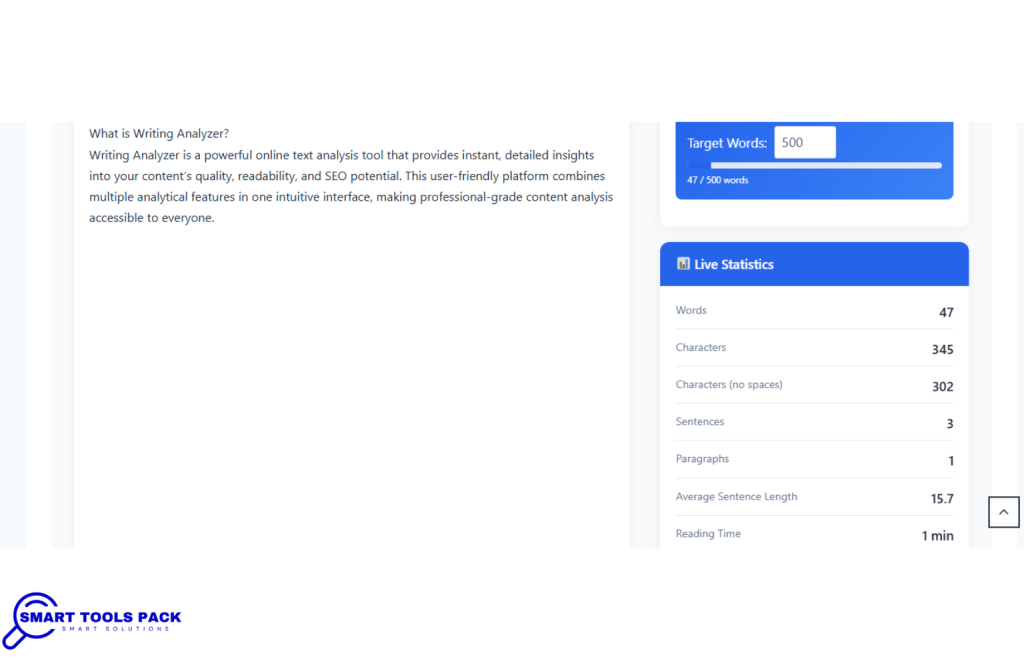
What is Writing Analyzer?
Writing Analyzer is a powerful online text analysis tool that provides instant, detailed insights into your content’s quality, readability, and SEO potential. This user-friendly platform combines multiple analytical features in one intuitive interface, making professional-grade content analysis accessible to everyone.
Core Frontend Features
1. Real-Time Text Statistics Dashboard
The moment you paste or type your content, Writing Analyzer instantly displays comprehensive statistics:
Word Count Analysis: Precise word counting for meeting specific content requirements
Character Count: Essential for social media posts and meta descriptions
Sentence Count: Track sentence structure and variety
Paragraph Analysis: Monitor paragraph distribution for better flow
Average Sentence Length: Optimize for readability and engagement
Reading Time Estimation: Know exactly how long readers need to consume your content
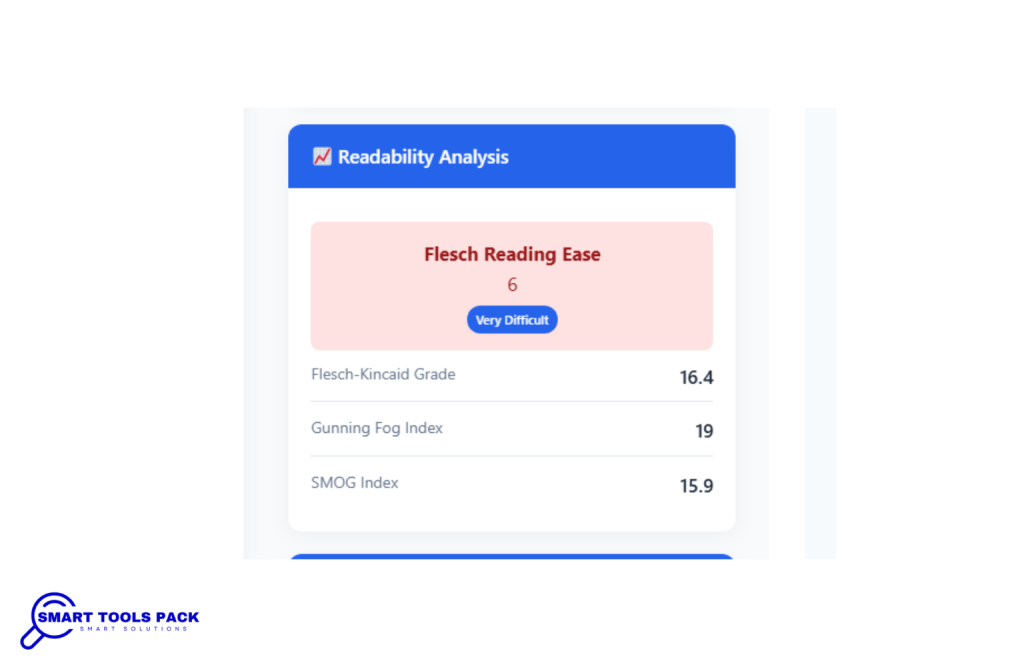
Target Flesch Reading Ease scores: 60-70 for general audiences
Maintain grade level appropriate for your audience
Achieve consistent scores across all content
SEO Optimization Results
Keyword density: 1-3% for primary keywords
Natural keyword distribution throughout content
Improved search engine rankings
Engagement Enhancement
Increased time on page
Higher social media shares
Improved conversion rates
Better user feedback and comments
Integration with Content Workflows
Content Planning Phase
Analyze competitor content
Set quality benchmarks
Plan keyword strategies
Writing Phase
Real-time analysis during creation
Immediate feedback and suggestions
Continuous improvement tracking
Review and Editing Phase
Version comparison analysis
Final quality assessment
Pre-publication optimization
Post-Publication Analysis
Performance tracking
Continuous improvement identification
Future content planning insights
Advanced Tips for Power Users
1. Keyword Strategy Optimization
Use long-tail keywords naturally
Implement semantic keyword variations
Monitor keyword cannibalization
2. Content Structure Enhancement
Optimize heading hierarchy
Improve paragraph transitions
Enhance scannable content elements
3. Audience-Specific Optimization
Adjust tone for different demographics
Customize complexity levels
Tailor content length appropriately
4. Multi-Format Content Creation
Optimize for blog posts
Adapt for social media
Enhance email marketing content
Improve video script readability
Conclusion
Writing Analyzer provides comprehensive frontend features that transform how you create, analyze, and optimize content. From real-time statistics and readability assessment to advanced sentiment analysis and version comparison, every feature is designed to help you create content that engages readers and performs well in search engines.
The intuitive interface, combined with powerful analytical capabilities, makes professional-grade content analysis accessible to writers of all skill levels. Whether you’re a blogger looking to improve engagement, a marketer optimizing for SEO, or a student enhancing academic writing, Writing Analyzer provides the tools and insights needed for success.
By leveraging these frontend features, you can create content that not only meets your immediate goals but also builds long-term audience engagement and search engine visibility. The combination of real-time analysis, comprehensive reporting, and user-friendly design makes Writing Analyzer an essential tool for anyone serious about content quality.
Frequently Asked Questions (FAQ)
Q1: How accurate are the readability scores provided by Writing Analyzer?
A: Writing Analyzer uses industry-standard readability formulas that have been validated through decades of research. The Flesch Reading Ease, Flesch-Kincaid Grade Level, and other metrics are the same formulas used by educational institutions, government agencies, and major publishing houses. Our algorithms are regularly updated to ensure accuracy and reliability.
Q2: Can I analyze content in real-time as I write?
A: Yes! Writing Analyzer provides instant, real-time analysis as you type or paste content. The metrics update automatically, allowing you to see how changes affect your content’s readability, keyword density, and sentiment scores immediately. This feature helps maintain writing flow while ensuring quality standards.
Q3: What’s the optimal keyword density for SEO?
A: For primary keywords, we recommend maintaining a density between 1-3%. This range provides sufficient SEO value without appearing spammy to search engines. Secondary keywords should appear naturally throughout your content. Our tool provides specific recommendations based on your content length and target keywords.
Q4: How does the sentiment analysis feature work?
A: Our sentiment analysis uses advanced natural language processing to identify emotional undertones in your text. It analyzes word choice, sentence structure, and contextual clues to determine whether your content conveys positive, negative, or neutral sentiment. This helps ensure your tone aligns with your intended message and brand voice.
Q5: Can I compare different versions of my content?
A: Absolutely! The version comparison tool is one of our most popular features. You can analyze two versions of your content side-by-side, seeing exactly how changes affect readability scores, keyword density, sentiment, and other metrics. This data-driven approach helps you make improvements that actually enhance your content quality.
Q6: Is Writing Analyzer suitable for academic writing?
A: Yes, Writing Analyzer is excellent for academic writing. It helps ensure appropriate complexity levels for scholarly audiences while maintaining clarity. The readability assessments help students and researchers write papers that meet academic standards while remaining accessible to their intended readers. Many universities recommend similar tools for improving student writing.
Q7: How does the mobile version compare to the desktop experience?
A: Our mobile-optimized interface provides the same comprehensive analysis features as the desktop version. The responsive design ensures all tools are easily accessible on smartphones and tablets, with touch-friendly navigation and optimized layouts. You can analyze content, view reports, and make improvements from any device.
Q8: Can I export my analysis results?
A: Yes, Writing Analyzer offers comprehensive export options. You can generate detailed PDF reports with visual charts and graphs, customize which metrics to include, and even brand reports with your logo. Export formats include PDF, CSV, and TXT files, making it easy to share results with team members or clients.
Q9: How often should I analyze my content?
A: We recommend analyzing content during the writing process and before final publication. Many users find it helpful to do an initial analysis after completing their first draft, make improvements based on recommendations, and then do a final analysis before publishing. For ongoing content creation, regular analysis helps maintain consistent quality standards.
Q10: What makes Writing Analyzer different from other text analysis tools?
A: Writing Analyzer combines multiple analysis methods in one comprehensive, user-friendly interface. Unlike tools that focus on single metrics, we provide readability assessment, keyword analysis, sentiment detection, and version comparison all in one place. Our real-time analysis, mobile optimization, and professional reporting features set us apart from basic text analyzers.
Q11: Does the tool work offline?
A: While full functionality requires an internet connection, basic analysis features work offline once the page is loaded. This includes word count, character count, and basic readability assessment. Advanced features like sentiment analysis and detailed reporting require an active internet connection for optimal performance.
Q12: Can Writing Analyzer help improve my search engine rankings?
A: Yes, by optimizing your content’s readability, keyword density, and structure, Writing Analyzer helps create content that search engines favor. Well-optimized content typically sees improved rankings within 2-3 months of consistent use. The tool helps you create content that both search engines and human readers appreciate, leading to better overall performance.
Q13: Is there a limit to how much content I can analyze?
A: Writing Analyzer can handle content of various lengths, from short social media posts to lengthy articles and reports. The tool is optimized to provide quick analysis regardless of content length, ensuring you get comprehensive insights whether you’re analyzing a tweet or a white paper.
Q14: How does the dark mode feature benefit users?
A: Dark mode reduces eye strain during extended writing sessions, which is particularly beneficial for writers who work long hours or in low-light conditions. Research shows that dark interfaces can reduce eye fatigue by up to 63% during prolonged computer use. The feature automatically adjusts all interface elements for optimal visibility and comfort.
Q15: Can I use Writing Analyzer for different types of content?
A: Absolutely! Writing Analyzer works with all types of written content including blog posts, academic papers, business reports, marketing copy, social media posts, emails, creative writing, and more. The tool adapts its analysis to provide relevant insights regardless of content type, length, or intended audience.
Transform your writing today! Visit smarttoolspack.com to access Writing Analyzer and discover how professional content analysis can elevate your writing to the next level.