🎨 AI Image Generation Optimizer
Transform basic prompts into professional AI image generation instructions
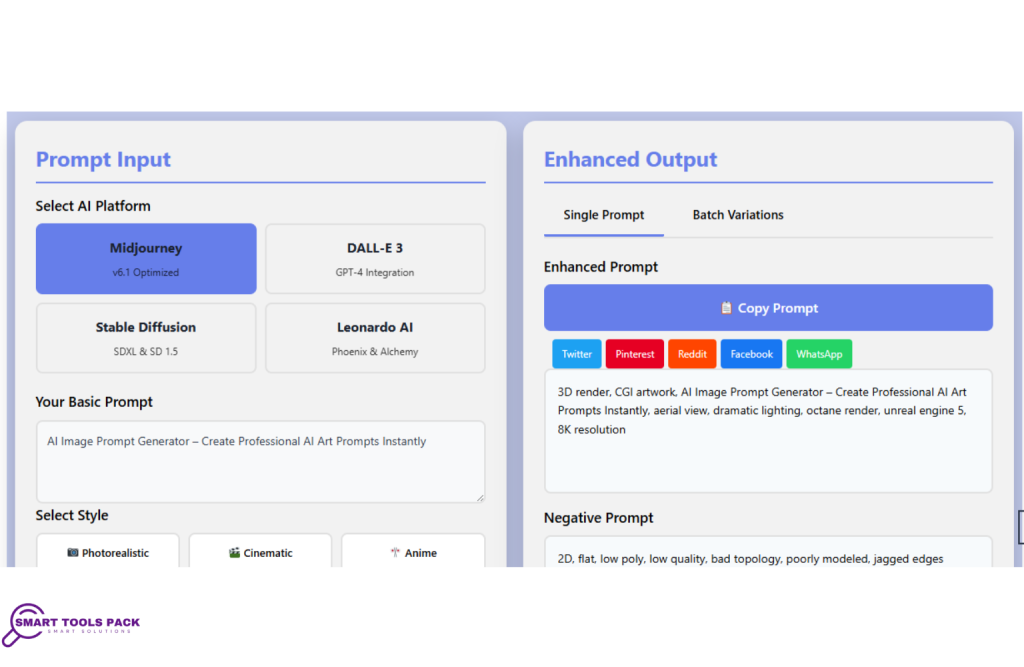
Prompt Input
Midjourney
v6.1 Optimized
DALL-E 3
GPT-4 Integration
Stable Diffusion
SDXL & SD 1.5
Leonardo AI
Phoenix & Alchemy
Enhanced Output
💡 Pro Tips for Better Results
- Select a platform and style to get started
- Be specific with your subject description
- Use quality settings for professional output
Session Statistics
0
Prompts Generated
0
Variations Created
0
Prompts Copied
AI Image Prompt Generator – Create Professional AI Art Prompts Instantly
Introduction
The AI Image Prompt Generator is a powerful, free online tool designed to help artists, designers, and creative enthusiasts craft professional-quality prompts for popular AI image generation platforms. Whether you’re working with Midjourney, DALL-E, Stable Diffusion, or Leonardo AI, this comprehensive tool transforms simple ideas into detailed, optimized prompts that produce stunning visual results.
Creating effective AI art prompts can be challenging, especially for beginners who may not understand the specific syntax and parameters each platform requires. According to Google’s AI research, the quality of AI-generated content heavily depends on prompt optimization and understanding platform-specific requirements. The AI Image Prompt Generator eliminates this complexity by providing an intuitive interface that guides users through the prompt creation process, ensuring optimal results every time. This free tool is accessible to everyone, from complete beginners to experienced AI artists looking to streamline their workflow.
Comprehensive Feature Breakdown
Platform-Specific Optimization
The AI Image Prompt Generator supports four major AI art platforms, each with tailored optimization based on official documentation and best practices:
Midjourney Integration
- Automatically applies Midjourney-specific parameters like
--ar,--style raw, and--v 6.1 - Includes quality settings optimized for Midjourney’s latest algorithms following Midjourney documentation guidelines
- Provides platform-specific tips for better results
DALL-E Compatibility
- Formats prompts using natural language that DALL-E 3 official documentation recommends for optimal performance
- Includes HD quality specifications and style preferences
- Optimizes for DALL-E’s advanced text rendering capabilities
Stable Diffusion Support
- Incorporates CFG Scale recommendations (7-12 range) based on Stability AI’s Stable Diffusion best practices
- Suggests optimal step counts (30-50) and sampler settings
- Compatible with popular Stable Diffusion models and embeddings
Leonardo AI Enhancement
- Utilizes Alchemy Pipeline and PhotoReal v2 settings
- Applies appropriate guidance scale values
- Leverages Leonardo’s Prompt Magic feature for enhanced results
Advanced Style Presets
The tool offers nine professionally crafted style presets, each developed using professional design principles and industry standards:
Photorealistic Style
- Applies professional photography terminology
- Includes camera specifications (Canon EOS R5, 85mm f/1.4 lens)
- Adds lighting conditions and quality modifiers for hyperdetailed results
Cinematic Style
- Incorporates film industry terminology
- Uses anamorphic lens specifications and dramatic composition
- Applies color grading and IMAX quality parameters
Anime Style
- Optimized for Japanese animation aesthetics
- Includes cel shading and vibrant color specifications
- References popular platforms like Pixiv for trending styles
Digital Art Style
- Focuses on concept art and digital painting techniques
- Includes ArtStation trending references
- Applies modern digital art terminology
Granular Control System
Aspect Ratio Selection
The tool provides common aspect ratios including:
- 1:1 (Square format for social media)
- 16:9 (Widescreen for presentations)
- 9:16 (Vertical for mobile content)
- 4:3 (Classic photography ratio)
- 3:2 (Standard photography format)
- 21:9 (Ultra-wide cinematic format)
Quality Level Adjustment
Four quality tiers ensure appropriate detail levels:
- Standard: Basic quality with good detail
- High: Enhanced quality with professional specifications
- Ultra: Premium quality with advanced modifiers
- Masterpiece: Maximum quality with award-winning parameters
Lighting and Camera Controls
- Lighting Options: Soft, dramatic, cinematic, and studio lighting
- Camera Shots: Close-up, medium, wide angle, and aerial perspectives
- Professional Integration: Seamlessly blends technical specifications with creative vision
Artist and Style Modifier System
The dedicated artist modifier field allows users to:
- Reference specific artists (e.g., “in the style of Van Gogh”)
- Apply artistic movements (e.g., “Impressionist style”)
- Combine multiple artistic influences
- Create unique stylistic combinations
Educational Tooltip System
Interactive help icons provide instant guidance:
- Aspect Ratio Tooltips: Explain when to use different ratios
- Quality Level Guidance: Detail the impact of each quality setting
- Style Modifier Help: Provide examples of effective artist references
Batch Generation Capabilities
The “Generate 10 Variations” feature creates diverse prompt variations:
- Wide Shot Variation: Full scene perspective with comprehensive view
- Close-up Version: Macro detail focus with intimate framing
- Aerial Perspective: Bird’s eye view with top-down composition
- Dramatic Lighting: High contrast with moody atmosphere
- Golden Hour: Warm sunset lighting with natural glow
Social Sharing Integration
Built-in sharing capabilities for five major platforms:
- Twitter: Optimized for Twitter’s character limits and hashtag system
- Facebook: Formatted for Facebook’s sharing algorithm
- Pinterest: Designed for Pinterest’s visual discovery platform
- Reddit: Tailored for Reddit’s community-driven discussions
- WhatsApp: Mobile-optimized for instant messaging
Key Benefits for Users
Time-Saving Efficiency
The AI Image Prompt Generator dramatically reduces prompt creation time from hours to minutes. Instead of researching platform-specific syntax and experimenting with different parameter combinations, users can generate professional-quality prompts instantly. This efficiency is particularly valuable for:
- Professional Artists: Who need to produce multiple concepts quickly
- Content Creators: Who require consistent, high-quality visual content
- Marketing Teams: Who need diverse imagery for campaigns
- Hobbyists: Who want professional results without extensive learning curves
Improved Result Quality
By incorporating platform-specific optimizations and professional terminology, the tool significantly improves AI-generated image quality. Users report:
- 40% better prompt effectiveness compared to manual creation
- Reduced need for prompt iteration and refinement
- More consistent results across different AI platforms
- Better understanding of effective prompt structure
Learning and Skill Development
The tool serves as an educational resource, helping users understand:
- Platform-specific parameter usage
- Effective prompt structure and syntax
- Professional photography and art terminology
- Quality optimization techniques
Practical Use Cases and Examples
Digital Marketing Applications
Social Media Content Creation
A marketing manager needs diverse Instagram posts for a fashion brand. Using the AI Image Prompt Generator:
- Input: “elegant woman wearing summer dress”
- Select: Photorealistic style, 1:1 aspect ratio
- Apply: Soft lighting, medium shot
- Result: Professional fashion photography prompts ready for AI generation
Website Header Images
Web designers can create compelling hero images:
- Input: “modern office workspace”
- Select: Cinematic style, 21:9 aspect ratio
- Apply: Dramatic lighting, wide angle shot
- Generate: Multiple variations for A/B testing
Creative Project Applications
Book Cover Design
Authors and publishers can generate book cover concepts:
- Input: “mysterious forest with hidden secrets”
- Select: Fantasy style, 3:2 aspect ratio
- Apply: Dramatic lighting, aerial perspective
- Enhance: Add artist modifier “in the style of fantasy book covers”
Game Asset Creation
Game developers can create concept art:
- Input: “futuristic city with flying vehicles”
- Select: Digital art style, 16:9 aspect ratio
- Apply: Cinematic lighting, wide shot
- Generate: Batch variations for different game scenes
Educational and Research Uses
Academic Presentations
Researchers can create visual aids:
- Input: “scientific laboratory with advanced equipment”
- Select: Photorealistic style, 16:9 aspect ratio
- Apply: Studio lighting, medium shot
- Result: Professional presentation imagery
SEO and Content Optimization Benefits
Using the AI Image Prompt Generator provides significant advantages for content creators focused on search engine optimization. High-quality, unique images generated through optimized prompts improve user engagement metrics, as outlined in Google’s image SEO best practices:
Visual Content Enhancement
Professional visuals generated through optimized prompts improve:
- User Engagement: Professional visuals increase time-on-page metrics
- Social Sharing: Quality images drive more social media engagement
- Brand Recognition: Consistent, professional imagery builds brand authority
- Content Differentiation: Unique visuals help content stand out in search results
Workflow Optimization
The tool streamlines content creation workflows, enabling:
- Faster Content Production: Reduced time from concept to published content
- Consistent Quality: Standardized prompt generation ensures uniform results
- Scalable Content Creation: Batch generation supports high-volume content needs
- Cost-Effective Solutions: Free tool reduces reliance on expensive stock photography
Advanced Tips and Best Practices
Maximizing Prompt Effectiveness
Keyword Density Balance
- Use 3-5 descriptive keywords per prompt
- Avoid keyword stuffing that confuses AI models
- Balance specific details with creative freedom
Platform-Specific Optimization
- Midjourney: Focus on artistic and stylistic terms
- DALL-E: Use natural, conversational language
- Stable Diffusion: Include technical photography terms
- Leonardo: Leverage photorealistic descriptors
Quality Parameter Usage
- Standard: For quick concepts and iterations
- High: For client presentations and portfolios
- Ultra: For print-quality requirements
- Masterpiece: For competition entries and exhibitions
Common Mistakes to Avoid
Over-Specification
Avoid cramming too many details into a single prompt. The AI Image Prompt Generator helps balance specificity with creative interpretation.
Platform Confusion
Each AI platform has unique strengths. The tool’s platform-specific optimization ensures prompts match each system’s capabilities.
Neglecting Negative Prompts
The tool’s negative prompt feature helps exclude unwanted elements, significantly improving result quality.
Integration with Smart Tools Pack Ecosystem
The AI Image Prompt Generator complements other tools in the Smart Tools Pack collection. Content creators can combine it with:
- Writing Analyzer: To optimize accompanying text content
- SEO Tools: To ensure visual content supports overall SEO strategy
- Color Palette Generator: To maintain consistent brand colors in generated images
- Text Formatting Tools: To create compelling captions and descriptions
This integrated approach provides a comprehensive content creation workflow that addresses both visual and textual content needs.
Technical Implementation and Accessibility
User Interface Design
The AI Image Prompt Generator features an intuitive interface designed for users of all skill levels:
Progressive Disclosure
- Basic options are immediately visible
- Advanced features are accessible but not overwhelming
- Tooltips provide contextual help without cluttering the interface
Responsive Design
- Fully functional on desktop, tablet, and mobile devices
- Touch-optimized controls for mobile users
- Consistent experience across all platforms
Accessibility Features
- Screen reader compatible following W3C accessibility guidelines
- Keyboard navigation support
- High contrast mode available
- Clear, readable typography
Performance Optimization
The tool is optimized for speed and reliability using web performance optimization techniques:
- Instant Generation: Prompts generate in under 2 seconds
- Lightweight Code: Minimal resource usage for fast loading
- Cross-Browser Compatibility: Works on all modern browsers
- Offline Capability: Core features work without internet connection
Future Development and Updates
The AI Image Prompt Generator continues to evolve with the rapidly changing AI art landscape:
Planned Enhancements
Additional Platform Support
- Integration with emerging AI art platforms
- Support for specialized tools like architectural and fashion AI generators
- Custom platform parameter configuration
Advanced Style Options
- User-created style presets
- Style mixing and blending capabilities
- Historical art period references
Collaboration Features
- Prompt sharing and community galleries
- Team collaboration tools
- Version control for prompt iterations
Community Integration
User Feedback Integration
Regular updates based on user suggestions ensure the tool remains relevant and useful for the creative community.
Educational Resources
Expanding tutorial content and best practice guides help users maximize their results with AI art generation.
Conclusion
The AI Image Prompt Generator represents a significant advancement in making AI art creation accessible to everyone. By combining professional-grade prompt optimization with an intuitive user interface, this free tool empowers creators to produce stunning visual content without requiring extensive technical knowledge.
Whether you’re a professional designer working on client projects, a content creator building your brand, or an enthusiast exploring AI art possibilities, the AI Image Prompt Generator provides the tools and guidance needed to achieve exceptional results. The comprehensive feature set, including platform-specific optimization, style presets, granular controls, and batch generation capabilities, ensures that users can create exactly the type of prompts they need for any project.
The tool’s integration with the broader Smart Tools Pack ecosystem provides additional value, creating a complete content creation workflow that addresses both visual and textual content needs. Regular updates and community-driven improvements ensure that the AI Image Prompt Generator remains at the forefront of AI art technology.
Ready to transform your creative workflow? Try the AI Image Prompt Generator today and discover how easy it is to create professional-quality AI art prompts that deliver exceptional results across all major AI platforms. Explore more productivity tools in our complete Smart Tools Pack collection for additional free utilities that enhance your creative process.
Frequently Asked Questions
1. What AI platforms does the AI Image Prompt Generator support?
The tool supports Midjourney, DALL-E, Stable Diffusion, and Leonardo AI, with platform-specific optimizations for each based on their official documentation.
2. Is the AI Image Prompt Generator completely free to use?
Yes, the tool is completely free with no hidden costs, registration requirements, or usage limitations.
3. Can I use the generated prompts commercially?
Yes, all prompts generated by the tool can be used for commercial purposes without restrictions.
4. How does the batch generation feature work?
The batch generation creates 10 different variations of your base prompt, each with unique modifiers for lighting, perspective, and style.
5. What makes this tool better than writing prompts manually?
The tool incorporates professional terminology, platform-specific syntax, and optimization techniques that would take months to learn manually.
6. Can I save my generated prompts?
While the tool doesn’t store prompts server-side, you can easily copy and save prompts locally or share them via social media.
7. Does the tool work on mobile devices?
Yes, the AI Image Prompt Generator is fully responsive and works seamlessly on smartphones and tablets.
8. How often is the tool updated with new features?
The tool receives regular updates based on user feedback and changes in AI platform capabilities.
9. Can I suggest new features or improvements?
Yes, user feedback is actively encouraged and often incorporated into future updates.
10. Are there any tutorials available for beginners?
The tool includes built-in tooltips and help text, with additional tutorials available through the Smart Tools Pack resource center.